 Siri & Dictation in iOS 16: What’s New
Apple’s voice assistant, Siri, gets several meaningful upgrades in iOS 16, especially in offline capability, messaging control, and usability improvements.
These changes make Siri more practical for everyday hands-free use.

 Smarter Messaging with Siri
 No setup for Shortcuts
-
Shortcuts now work immediately after app installation
-
No manual setup required
 Emoji in messages

You can now say things like:
-
“Send a smile emoji”
-
“Add heart emoji”
Siri will insert emojis directly into your text messages.
 New Call Control Features
 Hang up calls with voice
You can now say:
- “Hey Siri, hang up”
This works during hands-free or speakerphone calls, making it easier when your hands are busy.
 Automatic Message Sending
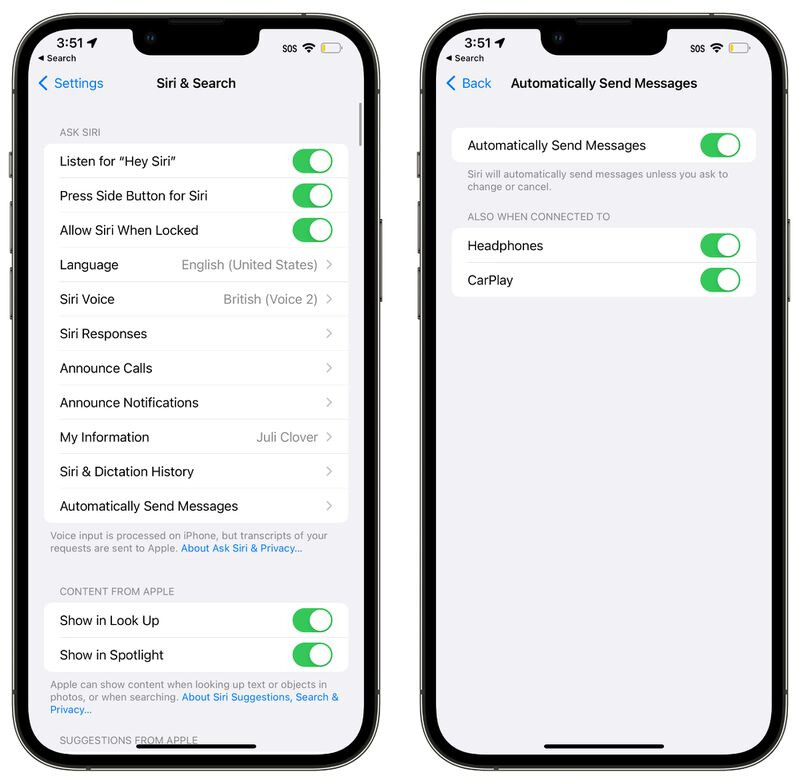
A new option allows Siri to send messages without confirmation:
-
Removes extra approval step
-
Works with CarPlay
-
Can be toggled on or off in Settings
 Useful for driving or quick replies.
 Siri Guidance (“What can I do?”)

You can now ask:
-
“Hey Siri, what can I do here?”
-
“Hey Siri, what can I do with this app?”
Siri will show available commands for the current app or situation.
 More Offline Siri Power
Siri can now work better without internet:
-
HomeKit control
-
Intercom commands
-
Voicemail actions
This makes Siri faster and more reliable in low or no connectivity situations.
 Accessibility Improvements

New options in Settings include:
-
 Siri pause time (Default / Longer / Longest)
 -
 Announce notifications aloud
 -
Prefer spoken responses even when silent mode is on
These help Siri adapt better to user speech patterns and environments.
 Dictation Gets a Major Upgrade
Dictation is significantly improved in iOS 16:
 Hybrid typing + voice
-
You can type while still dictating
-
Switch seamlessly between keyboard and voice
 Smarter punctuation
-
Automatically adds commas and periods
-
Reduces need to speak punctuation manually
Emoji support
- You can dictate emojis directly
 Easier access in Messages
-
Dictation button is now directly in the message field
-
Replaces older voice message UI placement
 Bottom Line
Siri in iOS 16 becomes more practical, especially for:
-
Driving and hands-free use
-
Messaging without confirmation steps
-
Offline basic tasks
-
Faster dictation and editing
Combined with improved Dictation, iOS 16 makes voice interaction much closer to a real productivity tool rather than just a simple assistant.